A gallery emails to ask which of your pieces they're currently holding. You open the spreadsheet, find three rows that say "gallery", and realise you're not sure whether one of them came back after the summer show.
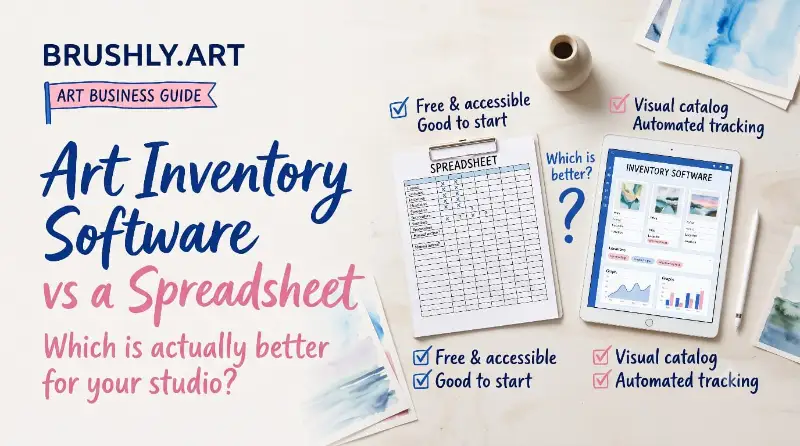
An art inventory is a single record of every piece you've made: what it is, where it is right now, what it's priced at, and what's happened to it. Most artists start with a spreadsheet, and for a while that's the right call. Below are the columns a good art inventory spreadsheet needs, the point where a sheet starts to cost you sales, and what artwork inventory software handles that a spreadsheet can't.
The art inventory template
One row per piece, or one row per edition if you make prints. Here are the columns worth having from day one.
| Column | What goes in it | Example |
|---|---|---|
| Inventory number | Your own ID, never reused | AB-2026-031 |
| Title | The finished title, not the file name | Autumn Birches |
| Year | When it was completed | 2026 |
| Medium | Materials and support | Acrylic on canvas |
| Dimensions | Height by width, with units | 16 × 20 in |
| Edition | For prints: the run and how many exist | 25, open, or original |
| Quantity | How many you have to sell | 1 |
| Status | Available, reserved, sold, on display, in transit, damaged | Available |
| Location | Where it physically is today | Studio, rack B |
| Price | Your current retail price | $900 |
| Currency | Matters once you sell abroad | USD |
| Buyer | Who bought it, once it sells | |
| Sale date | When it sold | |
| Certificate number | If you issued a certificate of authenticity | COA-2026-014 |
| Image | A link to a good photograph | |
| Notes | Framing, condition, exhibition history | Framed in oak, shown at spring fair |
Two columns do most of the work: status and location. Everything else describes the art. Those two describe your business, and they're the ones that go stale.
How to catalog artwork you already have
Start with whatever is physically in your studio, not with the archive in your head. Give each piece an inventory number and write it on the back in pencil. Measure it and photograph it in good light, then fill in one row. Then do the same for anything at a gallery, on loan, or out at a fair, and give each of those places its own location name. It's tedious once. After that, you're only adding new work and updating what moves.
Where a spreadsheet starts to break
A spreadsheet works while all your work is in one place and you're the only person selling it. Three things change that.
Work in more than one place. When pieces live in the studio, at a gallery and in an online shop, "location" stops being a single fact. A print run can be split between them: some here, some there, some sold. A spreadsheet can hold that, but only if you update it every time anything moves, in every row it touches.
Selling through more than one channel. A painting sold at a fair on Saturday is still marked available in the sheet on Monday, and still listed on your website. The day a second buyer tries to buy it is the day you find out.
Galleries and fairs asking for paperwork. A gallery wants a list of what they're holding and at what price. A fair wants labels for the wall. Each of those means copying rows into a new document, retyping prices, and hoping you copied the current ones.
None of this happens at once. It creeps in around the time you have more than one location and more than a few dozen pieces, and by then the spreadsheet is the thing you trust least.
What art inventory software does that a spreadsheet can't
Brushly's inventory keeps the same columns as the template above, but it treats location and status as the live, moving things they are.
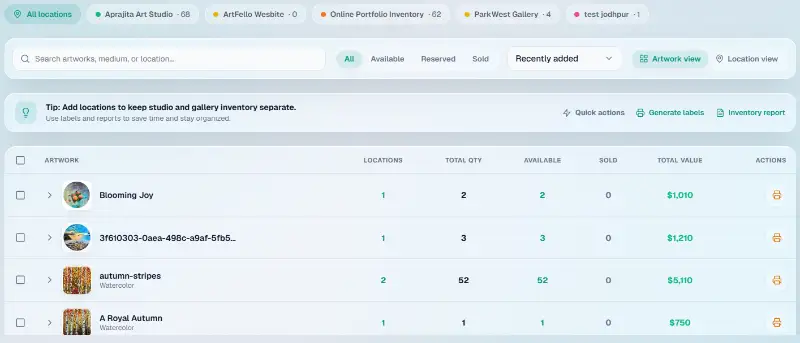
Every piece can be split across locations with a count at each one. So your studio, a gallery and your online portfolio each show exactly what they're holding. The chips across the top show how many pieces sit at each location, and one tap filters the whole list to just that place. Each piece has one of six statuses: available, reserved, sold, on display, in transit or damaged. You can switch between an artwork view, which shows each piece and everywhere it lives, and a location view, which shows each place and everything in it.
It also keeps a history. A recent activity panel records each change as it happens, like a piece added to your online portfolio stock or marked available at a new location, with the date. So when a gallery asks whether that painting came back after the summer show, the answer is a line in the log, not a guess.
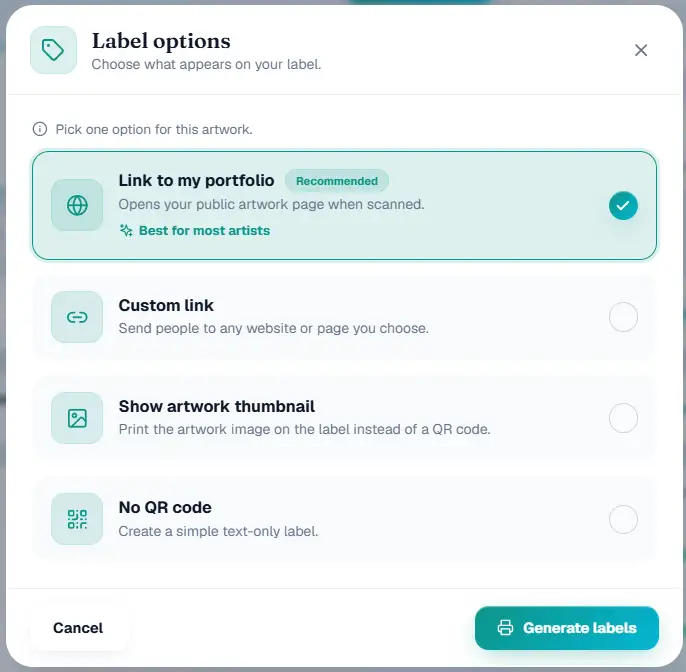
The paperwork comes from the same records. Tick the pieces you want and generate wall labels, 6 × 3 inches, printed in bulk as one PDF. Each label can carry a QR code that opens that artwork's page on your public portfolio when scanned, or a link you choose. You can also print the artwork's image instead of a QR code, or make a plain text label.
When a gallery asks what they're holding, filter the list to their location and export it as a CSV, or export everything for your own records. The inventory report turns the same records into a PDF: a summary, a breakdown by location, and each artwork listed with its image. That's the document you'd otherwise build by hand before every meeting.
And the selling side keeps it honest. When a piece sells through your online portfolio, it's marked sold in your inventory automatically. You can't sell the same original twice because the spreadsheet didn't get updated.
Moving your spreadsheet in
You don't have to retype anything. Brushly imports a spreadsheet of your existing inventory, or an export from Artwork Archive, and maps the columns to its own. Files can be up to 10 MB and 5,000 rows, which covers most artists' entire archive in one go. Every imported row becomes a real artwork in your studio, with its inventory entry attached, so it's ready to put on your portfolio, invoice or certificate straight away.
Inventory tracking is unlimited on every Brushly plan, so a large archive doesn't push you onto a bigger plan.
When to switch
If everything you make lives in your studio and you sell a few pieces a year, keep the spreadsheet. It's free, and the template above is all you need.
Switch when your work is in two or more places at once, when you sell through more than one channel, or when a gallery starts asking you for lists. At that point the spreadsheet stops saving you time and starts costing you sales, usually one double-sold painting at a time.
Quick answers about art inventory
What's the best way to catalog artwork?
One record per piece, with a permanent inventory number, a photograph, measurements, and its current location and status. The tool matters less than doing it consistently and updating it the day something moves.
What should an art inventory include?
At minimum: title, year, medium, dimensions, edition, status, location and price. Add buyer, sale date and certificate number as pieces sell, so the record doubles as your sales history.
How do I track artwork on consignment?
Give each gallery its own location and record the pieces you've sent there. When the gallery sells one, mark it sold. When pieces come back, move them to the studio. Filtering to that gallery's location gives you the list to check against theirs.
Can I import my inventory from Artwork Archive?
Yes. Export your inventory from Artwork Archive and import the file into Brushly, or use any spreadsheet. The import maps your columns and brings every piece in as a real artwork.
If you've got a spreadsheet you've stopped trusting, bring it with you. Every new Brushly account comes with a 7-day free trial, so open Brushly, import your sheet, and see every piece by location for the first time. When they sell, your invoices and certificates come from the same records.