The collector said yes. Now they're asking where to send the money, and you're about to open a blank document and wonder what's supposed to go on it.
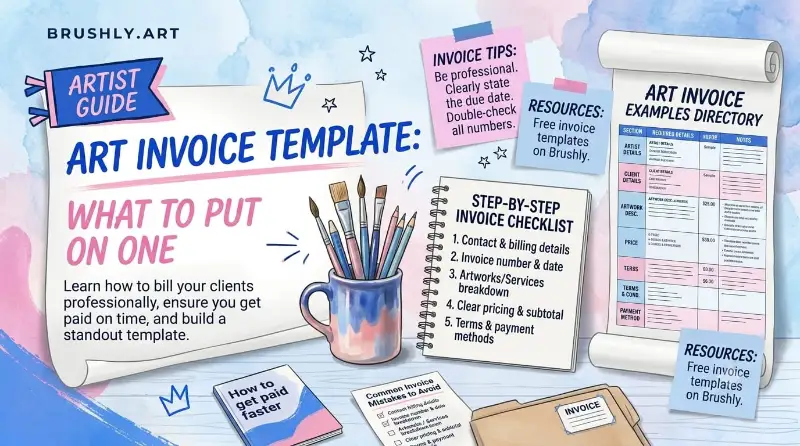
An art invoice needs your details, the collector's details, a clear description of the artwork, the price and any extras, the payment terms, and what's still owed. The template below covers all of it, including the lines a generic invoice template leaves out: the edition number, the certificate, deposits, and who keeps the copyright. Copy it, fill it in, and send it.
The art invoice template
Here's every field, with an example for a single original painting sold with a deposit.
| Field | Example |
|---|---|
| Your name or studio | Maya Torres Studio |
| Your contact details | Email, website, studio address |
| Your tax ID | Only if you're registered for one |
| Invoice number | INV-2026-014 |
| Issue date | September 10, 2026 |
| Payment terms and due date | Net 30, due October 10, 2026 |
| Collector's name and address | Where the work is going |
| Artwork title | Autumn Birches |
| Type of work | Original, print, limited edition, or commission |
| Medium and size | Acrylic on canvas, 16 × 20 in |
| Edition number | For prints only, such as 7 of 25 |
| Price | $900.00 |
| Shipping and insurance | $45.00 |
| Tax | Depends on where you and the buyer are |
| Discount | If you've agreed one |
| Total | $945.00 |
| Deposit received | $450.00 |
| Balance due | $495.00 |
| How to pay | Bank transfer, card link, or whatever you accept |
| Notes | Certificate of authenticity included; copyright remains with the artist |
The numbers hang together like this: $900 for the painting plus $45 shipping makes a $945 total. A 50% deposit on the painting is $450, which leaves $495 to pay before it ships.
Tax is the one line only you can fill in, because it depends on where you're registered and where the buyer lives. Nothing here is tax advice, so check with an accountant if you're not sure what applies.
The lines that make it an art invoice
Most invoice templates are built for plumbers and freelancers. Four lines matter for art that a generic template won't prompt you for.
The type of work. "Painting, $900" isn't enough. Say whether it's an original, a print, a limited edition or a commission, and give the medium and size. If the buyer ever resells the work, this invoice is part of its paper trail.
The edition number. For a limited edition print, the number is most of what the buyer is paying for. Put "7 of 25" on the invoice as well as on the print.
The certificate. If a certificate of authenticity comes with the work, say so on the invoice. It sets the expectation, and it links the two documents: the invoice proves the sale, the certificate proves the work.
Copyright. Buying a painting doesn't transfer the right to reproduce it, and plenty of buyers don't know that. One line in the notes ("copyright and reproduction rights remain with the artist") prevents an awkward conversation when the painting turns up on a t-shirt.
Deposits and commissions
A deposit changes what the invoice has to say. Instead of one number, it needs three: the total, what's been paid, and what's left.
For commissions, the usual pattern is a deposit before you start and the balance before you deliver. The deposit covers your materials and your time if the client disappears halfway through. Put the deposit terms in writing on the first invoice, then send a second invoice, or an updated one, for the balance when the work is finished.
For originals held for a buyer, like a painting reserved at an art fair, the same idea works: take a deposit, mark the invoice as partly paid, and don't ship until the balance arrives.
Why a document template gets harder the more you sell
A template in Word or Canva is fine for your first few sales. The trouble starts around the tenth.
Every invoice means retyping the same details: your address, your logo, the artwork's title and size, the collector's address. The invoice number has to be kept in sequence by hand. Nothing tells you which invoices are paid, which are half paid, and which are overdue, unless you keep a second spreadsheet to track the first one. And the invoice lives in a folder, disconnected from the record of the painting it was for.
None of this is hard. It's just the kind of admin that quietly eats a Sunday afternoon every month.
Making an art invoice in Brushly
Brushly's sales and invoicing turns the template above into a form that fills itself in from what you already have.
You start from the Sales page with Create invoice. Choose the collector from your list, and the issue date, due date and payment terms are already set, Net 30 by default. For each line, pick the artwork from your studio or type a title, then mark it as an original, print, limited edition or commission, with the price and quantity.
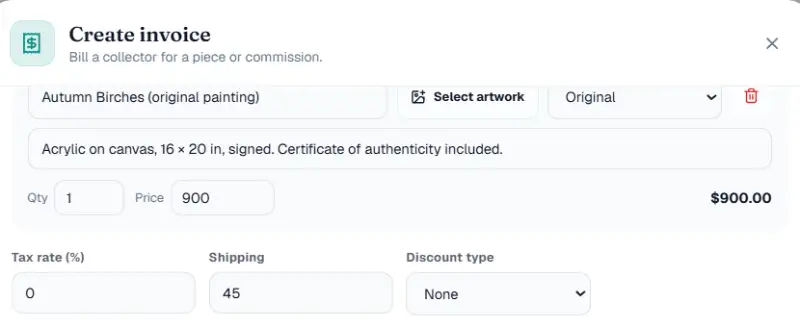
Tax rate, shipping and discounts, as a percentage or a fixed amount, sit underneath, and the subtotal and total update as you type.
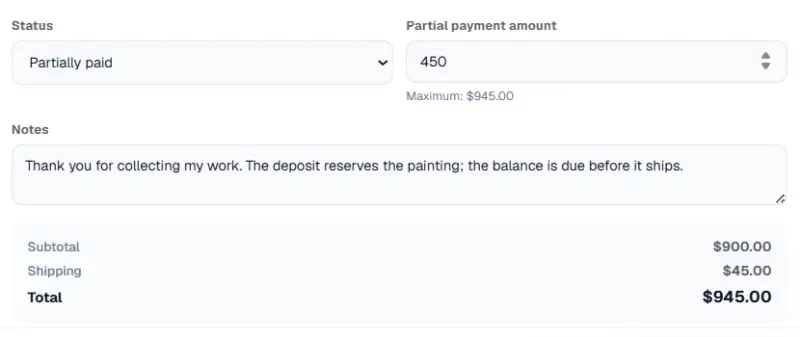
Deposits are built in. Set the status to Partially paid and a field appears for the amount received, capped at the invoice total so you can't record more than was owed. The same status list covers the whole life of an invoice: Draft, Sent, Partially paid, Paid, Overdue and Cancelled.
The invoice itself is laid out like the template. Your logo sits at the top, or your business name if you haven't uploaded one. Then come the invoice number, status and dates, a FROM block with your business name, address and tax ID, and a BILL TO block for the collector. Your footer carries your website and portfolio links, plus any closing note you like. You set those details once in your invoice settings, and every invoice after that uses them.
When it's ready, download the PDF, or email it to the collector from Brushly with the PDF attached, so the conversation and the invoice stay in one place.
When the sale happens on your portfolio
If a collector buys directly from your online portfolio, you don't write an invoice at all. The paid sale is recorded as a paid invoice automatically, the buyer is added to your collectors, and the artwork is marked sold in your inventory. The template above is for everything else: sales from DMs, studio visits, fairs and commissions.
Everything lands on the same Sales page, which shows what's paid, what's still pending, and can export it all as a CSV for your accountant at the end of the year.
Quick answers about art invoices
What's the difference between an invoice and a bill of sale?
An invoice asks for payment. A bill of sale, or receipt, confirms that the work has changed hands and been paid for. Many artists simply mark the invoice as paid and send it again, which works as a receipt for most private sales.
How do I invoice for an art commission?
Send a first invoice for the deposit when the client agrees to the commission, with the full price, the deposit amount and the balance written out. When the work is finished, send the balance invoice, or update the first one, before you deliver.
Should the invoice include shipping?
Yes, as its own line. Shipping, packing and insurance for a painting can be a real cost, and listing it separately stops the buyer thinking the artwork price has gone up.
Do I need an invoice for a small sale?
For a $40 print at a market, a receipt is plenty. For an original or a commission, send an invoice. It protects you if payment goes quiet, and it gives the buyer a record for insurance.
If you've got a sale waiting on paperwork, you don't need to build the template from scratch. Every new Brushly account comes with a 7-day free trial, so open Brushly, go to Sales, and create the invoice from the artwork you just sold.