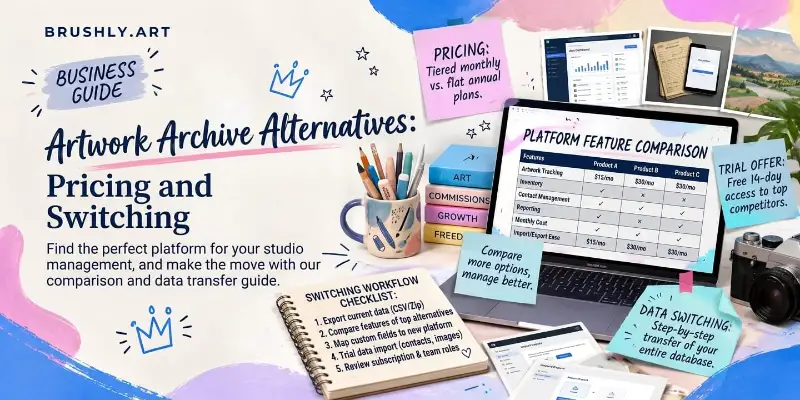
You open Artwork Archive to log a new painting and see the upgrade prompt. You're close to your plan's piece limit, and the next plan costs twice as much.
That moment is when most artists start looking for an Artwork Archive alternative. The honest answer depends on the size of your archive. Artwork Archive is good software, and on a small archive it's the cheaper option. Once you're past its first piece limit, the numbers change. Here's what Artwork Archive costs, what to check in any alternative, and how to move your whole inventory without retyping a single row.
What Artwork Archive costs
These are Artwork Archive's artist plans as listed on its pricing page in September 2026. Prices change, so check the page before you decide.
| Plan | Price paid annually | Billed monthly | Pieces | Locations | Users |
|---|---|---|---|---|---|
| Apprentice | $9/mo | $10/mo | 100 | 10 | 1 |
| Professional | $18/mo | $21/mo | 500 | 50 | 1 |
| Master | $36/mo | $42/mo | Unlimited | Unlimited | 3 |
Every plan includes a CRM, sales tracking, online invoicing, edition tracking, QR codes, reporting and a public profile. Professional adds a sales pipeline, private rooms, website embeds, PayPal payments on invoices and document storage. Master adds unlimited pieces and locations, three users, and a free data import. There's a 14-day free trial with no card required.
The limit that matters to most artists is the piece count. A painter who has been working for a few years passes 100 pieces sooner than they expect, and anyone with a real archive, including prints and older work, can pass 500.
What to check in any alternative
Whatever you're considering, including staying where you are, these are the questions worth answering before you move.
Limits. Is there a cap on pieces or locations, and what does crossing it cost?
Import. Can it read your Artwork Archive export directly, or will you be reformatting columns in a spreadsheet?
What survives the move. Do statuses, locations, prices and editions come across? What happens to fields it doesn't recognise?
Images. Will your photos come with the data, or will you re-upload hundreds of files?
Selling. Can buyers purchase from your portfolio, and does the platform take a commission?
Paperwork. Certificates of authenticity, wall labels and invoices from the same records, or three more tools?
Getting out again. Can you export everything if you ever leave?
The first four decide how painful the move is. The last three decide whether you're replacing one tool or several.
Brushly as an Artwork Archive alternative
Brushly covers the same ground, inventory, locations, editions, invoices and a public portfolio, with no limit on the number of pieces you track on any plan. It also puts selling, certificates and marketing in the same place as your records.
Here's what a year costs at different archive sizes, using Artwork Archive's annual prices and Brushly's Foundation plan at its annual price.
| Your archive | Artwork Archive, per year | Brushly Foundation, per year |
|---|---|---|
| Up to 100 pieces | $108 (Apprentice) | $172.74 |
| 101 to 500 pieces | $216 (Professional) | $172.74 |
| More than 500 pieces | $432 (Master) | $172.74 |
Under 100 pieces, Artwork Archive is cheaper, by about $65 a year. Between 101 and 500 pieces, Brushly is cheaper, and past 500 the difference is $259.26 a year. The plans don't include identical things. Artwork Archive's Master plan has three user seats, for example, and its Professional plan takes PayPal on invoices. So weigh the features you'd actually use, not just the totals.
What Brushly adds on top of the inventory:
An online portfolio that sells directly, with payments going straight to your own Stripe account and no Brushly commission on the sale.
Certificates of authenticity with a QR code that anyone can scan to verify.
Wall labels with a QR code linking to each piece on your portfolio, printed in bulk from your inventory.
Invoices with deposits, created from the same artwork records, and portfolio sales recorded as paid invoices automatically.
Palette AI tools for pricing, titles, descriptions and social posts, working from the same artworks.
Moving your inventory from Artwork Archive
This is the part people dread, and it's the part that should take the least time.
Download your inventory export from Artwork Archive. Then, in Brushly, open your inventory, choose Import, and pick Import from Artwork Archive. Brushly knows Artwork Archive's export columns, so it matches them for you: piece name, inventory number, medium, type, status, creation date, height, width, price, currency, description, notes, collections, current location, and image links.
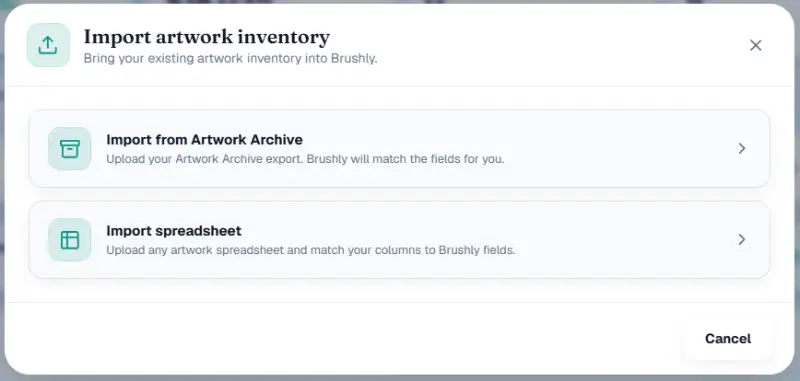
Upload the file, a CSV, XLS or XLSX up to 10 MB and 5,000 rows, and you land on a preview before anything is saved. It shows how many rows are ready and how many need an image. For every piece it shows what it will become: the price, the status, the location, and whether it's a new artwork. If a row matches an artwork you already have, you choose whether to skip it or update it.
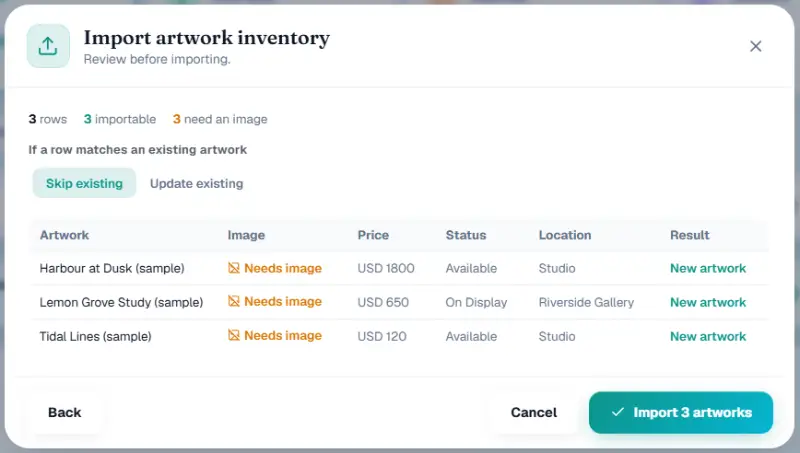
Statuses are translated rather than dropped. "For sale" and "in storage" become available, "on hold" becomes reserved, "on loan" becomes on display, and "needs repair" becomes damaged. Your locations come across by name, so a piece at a gallery arrives at that gallery. Columns Brushly doesn't use as fields, like depth, provenance, signed, and sale or gift details, aren't thrown away. They're kept in the piece's notes.
Images come across from their links. Where a link can't be fetched, the piece is still imported and marked as needing an image, so you can upload that one photo later instead of redoing the row.
Only the title is actually required. A messy archive still imports, and you tidy it up in one place afterwards.
Before you cancel Artwork Archive
A clean switch is mostly about not cutting the old tool off too early.
Keep both running for a short overlap. Artwork Archive gives new users 14 days free and Brushly gives 7, but even on a paid plan, a week of overlap costs very little and removes the risk.
After the import, spot-check a handful of pieces you know well: an original at a gallery, a print run split across locations, and something sold. If those three look right, the rest almost certainly are.
Look at anything you've printed that points back to your old profile. Wall labels or price tags with QR codes will still send people to Artwork Archive until you replace them. Brushly's labels link each piece to its page on your new portfolio, so reprint the ones on display first.
Finally, tell the people who matter. Update the portfolio link in your Instagram bio and email signature, and send galleries holding your work the new link, so nobody lands on a page you're about to close.
After the move
Once your archive is in, every piece is a real artwork in your studio, with its inventory attached. The same record can go on your portfolio for sale, onto a certificate, onto an invoice, or into a social post, without being re-entered anywhere.
If you're sure you'll stay small, under 100 pieces, a single location and no online selling, Artwork Archive's Apprentice plan is hard to beat on price. If you're past that, or you're paying for a separate website, invoicing and certificate tool alongside it, it's worth running your own archive through the preview above and seeing what comes across.
Quick answers
Does Artwork Archive have a free trial?
Yes. Its pricing page offers 14 days free with no credit card required.
Can I import my Artwork Archive inventory into Brushly?
Yes. Choose Import from Artwork Archive and upload your export. The columns are matched automatically, and you review a preview of every piece before anything is saved.
Will I lose provenance or edition details?
No. Fields Brushly doesn't map directly, including provenance, signature, depth and edition details, are kept in each piece's notes rather than discarded.
What happens to my images?
Images are brought across from the links in your export. Any that can't be fetched are flagged as needing an image, so you can see exactly which ones to upload.
Bring your archive and see it before you commit. Every new Brushly account comes with a 7-day free trial, so open Brushly, import your Artwork Archive export, and check the preview. See Brushly's plans for what each includes after the trial.