A stranger messages you on Instagram about a painting and asks the question you've been avoiding: "Do you have a website where I can buy it?"
The best website for an artist is the one that turns that message into a sale without you in the middle. It has to show the work well, tell a buyer who you are, take their money without taking a cut, and understand that an original can only be sold once. Most comparisons of artist website builders judge them on templates. This one compares the parts that decide whether a painting actually sells.
What an artist website actually has to do
An artist's site has four jobs, and the order matters.
It has to show the work at its best, large and uncropped, grouped the way you think about it: series, collections, recent pieces.
It has to tell your story. A buyer spending real money wants the About page, the exhibitions, the press, and a way to reach you. That's what turns "nice painting" into "I trust this artist."
It has to let a stranger buy, at 11pm, without emailing you first.
And it has to cope with the thing that makes art different from almost every other product: an original exists once. When it sells, it has to disappear from sale everywhere, straight away, and the sale needs to land in the same place as your records of that piece.
Generic website builders are very good at the first two. The last two are where artists end up spending evenings on workarounds.
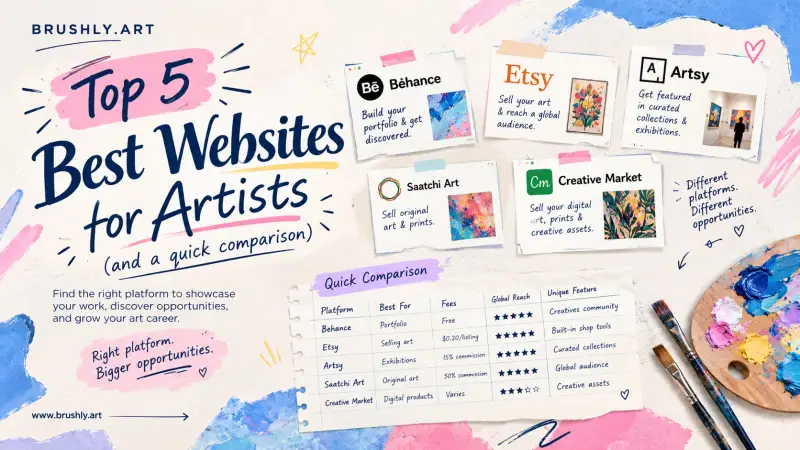
Five artist website builders, compared on selling
Prices and limits below were taken from each company's own pricing page in September 2026. Several are promotional or annual-billing prices, and all of them change, so check the linked page before you decide.
| Platform | Cheapest plan that can sell | Product limit | Platform fee on sales |
|---|---|---|---|
| Squarespace | Personal | Not a factor | 2% on Personal, 0% on higher plans |
| Wix | Core, $29.77/mo billed yearly | Not a factor | Not shown on the plans page |
| Format | Pro, $12/mo billed yearly (promotional) | 15 products on Pro | 0% ("commission-free") |
| Pixpa | Basic | 3 products on Basic, unlimited on Advanced | 0% on every plan |
| Brushly | Foundation, $17.99/mo | Unlimited artworks | 0% |
Two things stand out once it's laid out like this.
Platform fees have mostly gone. On Squarespace's entry plan, a $500 painting costs you $10 in platform fees, and on the others it's nothing. Card processing still applies everywhere, including Brushly. Pixpa's own pricing page puts the typical Stripe or PayPal rate at 2.9% plus 30¢, so that part is roughly the same whichever you choose.
Product limits are where cheaper plans bite. Fifteen products sounds like plenty until you're a painter with a year's output. If you sell prints in several sizes, each size can count as another product.
Where general website builders leave the work to you
Squarespace and Wix are built for any business that sells things, and they're excellent at it. The catch for artists is that a store thinks in products, not in paintings.
You can set a painting's stock to one so it sells out after a single purchase. But the sale then lives inside the store, separate from the other places that painting exists in your working life: the spreadsheet that says it's on loan to a gallery, the certificate you owe the buyer, the invoice, the note about which collector it went to. Every sale means updating three or four other things by hand, and the one you forget is the one a buyer finds later.
The other gap is the story. A builder gives you a blank About page. It doesn't know about your achievements, your collections or your mediums unless you write all of it in by hand, page by page.
What Brushly's online portfolio does differently
Brushly's online portfolio is built from the same records you already keep about your work, instead of being a separate website you maintain alongside them.
Your public page lives at a link like brushly.art/artists/yourname. It opens with your cover image, your name, your art style and your contact details, followed by your story and your achievements.
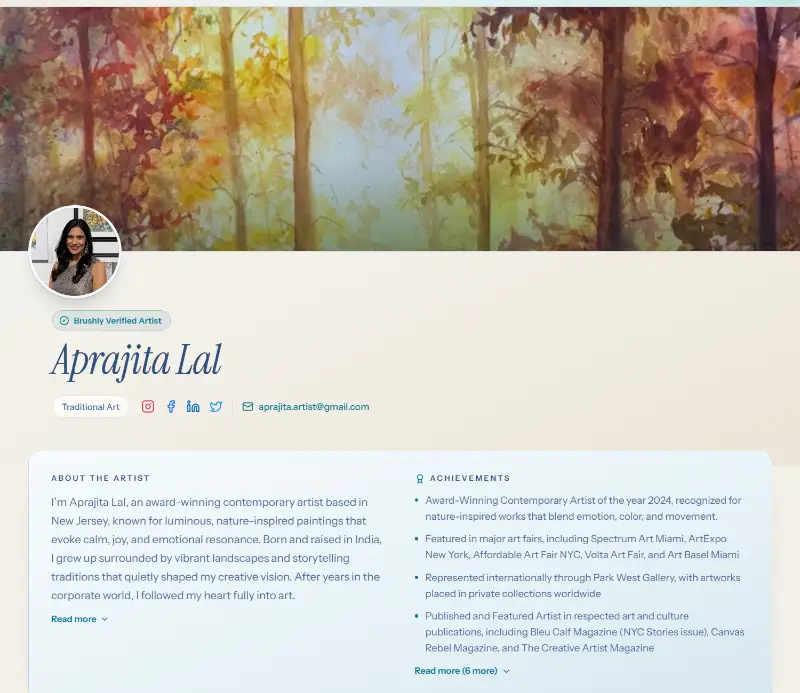
You edit it in four sections: Profile to tell your story, Showcase for artworks and collections, Social & Contact, and Sell Online for what collectors can buy. A live preview beside the editor shows the public page as you change it, and a portfolio strength checklist tells you what's still missing, such as a cover image, six featured artworks, an Instagram link or three achievements. If your bio is running long, there's a button to shorten it, and another to improve it with AI.
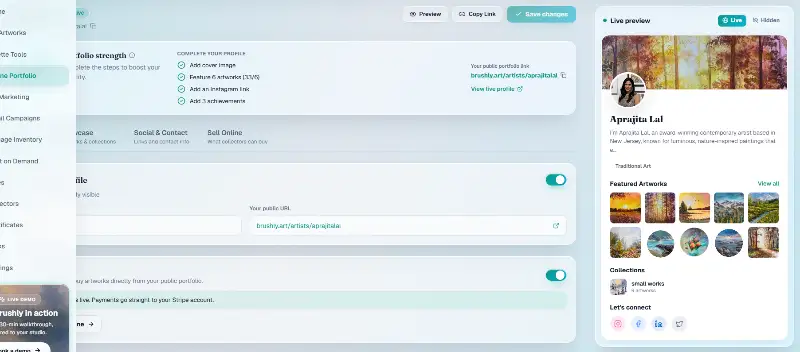
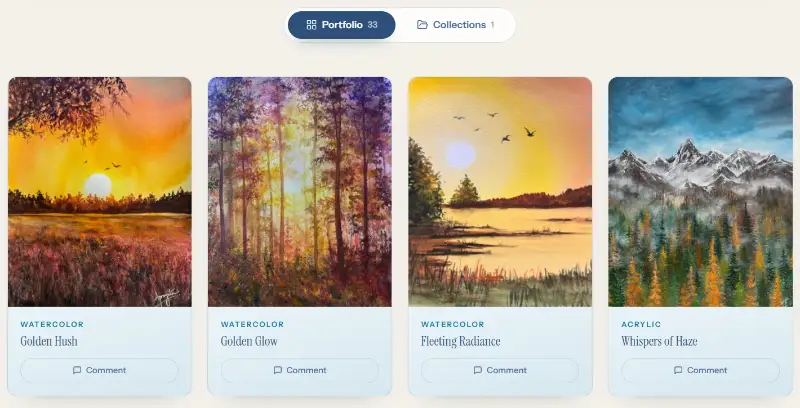
The artworks come straight from your Brushly studio, with their titles and mediums, grouped into the collections you've already made. Upload a new painting once and it can appear on your portfolio without being rebuilt on a separate site.
Selling an original without the workarounds
Selling runs through your own payment account. You connect Stripe, and payments go straight to it. Artists in India can also take UPI, where the buyer pays you directly and you confirm the payment before you ship. Brushly takes no commission on the sale. The payment is set up without any Brushly fee attached, by design.
A piece only becomes buyable when it's actually ready to sell. It needs a price, it has to be available in your inventory, and it has to ship to the buyer's country. Originals, prints and limited editions of the same work each get their own price. The Sell Online tab shows every artwork's status at a glance, with the one thing still missing, so nothing goes on sale by accident and nothing is stuck with a missing price.
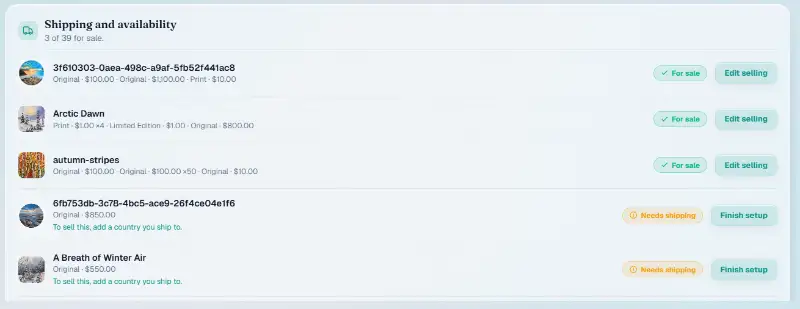
The one-of-a-kind problem is handled for you. When a buyer starts checkout, the piece is held while they pay, so two people can't both buy the last original. The price is checked again on Brushly's side before the payment is created, so an out-of-date page can't sell a painting for the wrong amount.
When the payment goes through, three things happen at once. The piece is marked sold in your inventory, the buyer is added to your collectors, and the sale is recorded as a paid invoice. Nothing to update by hand afterwards. Because it's the same artwork record the buyer just paid for, you can issue its certificate of authenticity from there too.
Which one should you choose?
If you want a fully designed brand site with a blog, custom pages and your own domain, and you're happy to manage the sales side yourself, Squarespace or Wix will serve you well.
If you're mostly showing work, with a handful of products, Format or Pixpa are good value. Just check the product limit on the plan you're looking at.
If selling originals is the point, and you want each sale connected to your inventory, certificates and records without the manual updates, that's what Brushly's portfolio is for. It's included on every Brushly plan, alongside unlimited artworks. If you'd rather have a bespoke site designed for you, Brushly also builds premium custom artist websites.
Quick answers about artist websites
Do I need a website if I already sell on Instagram?
Instagram finds you buyers, but it's a poor place to close a sale. A DM thread can't show a price list, take a card payment at midnight, or tell the next buyer a piece is gone. A portfolio link in your bio does all three. There's more on why selling through your own portfolio matters.
What should an artist portfolio website include?
Your strongest 15 to 30 works, grouped into series or collections. An About section written in the first person, your exhibitions and achievements, and a clear way to contact you. And for anything for sale, a visible price and a way to buy.
Is Squarespace or Wix better for artists?
Both are strong general builders. Squarespace is often preferred for its templates. Wix gives you more layout freedom. Neither is built specifically around original artwork, so the difference that matters more is how much of the selling side you want to manage yourself.
Can I sell art from my own website without paying commission?
Yes. Format, Pixpa and Brushly all list 0% platform commission on sales, and Squarespace's higher plans do too. Card processing fees still apply on every platform.
Try it with the work you already have. Every new Brushly account comes with a 7-day free trial, so open Brushly, fill in your profile, and set your first three pieces for sale. See pricing for what each plan includes after the trial.