Are you a mixed-media artist, illustrator, or art business owner who sees Facebook as a necessity but a huge source of anxiety? You know you need to be there to connect with local fans, promote events, and share long-form stories, but the effort required to craft effective Facebook posts often feels overwhelming.
Every artist and designer faces this problem: the conflict between the deep focus required to create art and the constant administrative pressure to manage an online business.
Why Generic Facebook Posts Fail Your Art Career
Unlike Instagram, Facebook often favors detailed updates, community engagement, and direct call-to-actions. When you rush your content, you pay the price:
Low Reach: Generic, poorly timed posts get buried by the Facebook algorithm, meaning your work never reaches potential art collectors or fans.
Inconsistent Branding: Without a planned approach, your page looks sporadic, damaging your professional image as an art business owner.
Lost Sales: Effective use of Facebook can drive traffic to your website or Etsy shop, but inconsistent effort leads to lost opportunities for art commissions and sales.
You deserve a way to maximize your Facebook impact without sacrificing your studio time.
Introducing Brushly Palette: Facebook Post
Imagine having a dedicated studio assistant whose sole focus is ensuring your Facebook page is consistently updated with perfectly timed, highly engaging content. That is the power of the Brushly Palette: Facebook Post feature. Brushly is your ultimate studio assistant for artists, designed to handle the heavy lifting of social media strategy.
Effortless Engagement: Automatically Generated and Published
This powerful tool helps you craft engaging Facebook updates that drive likes, shares, and visibility for your work. Instead of writing from scratch, your studio assistant uses intelligent analysis to auto-generate a compelling post. Then, with a simple click, it handles the direct publishing and scheduling for you. No more copying, pasting, or logging in at inconvenient times!
How Your Studio Assistant Optimizes Your Facebook Content
The Facebook Post feature gives you precise control over the final content before it goes live:
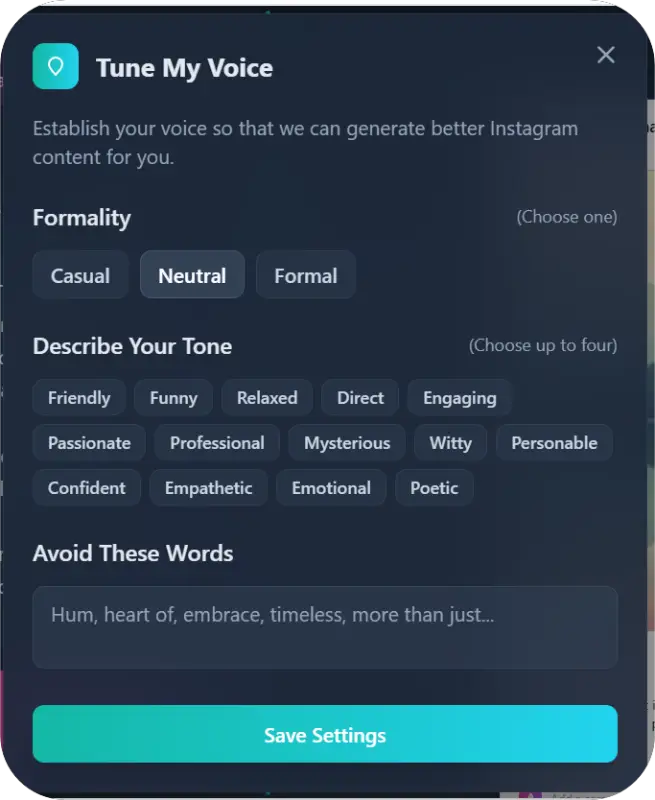
Posts Tuned to Formality: Tailor the post for any scenario. Need a formal announcement about a gallery package? Or a light-hearted behind-the-scenes update? You dictate the formality level.
Describe Your Tone: Ensure consistency by specifying your unique brand voice, whether you need a tone that is Mysterious, Witty, Poetic, or Confident.
Avoid These Words: Maintain professional consistency by listing any specific jargon or phrases you want excluded.
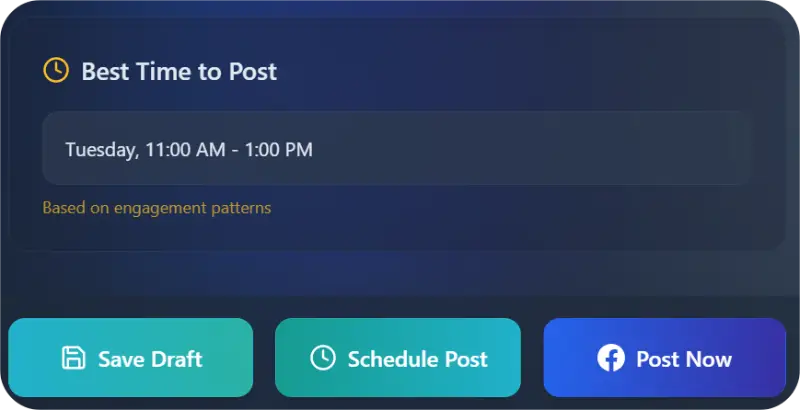
Best Time to Post & Scheduling: Crucially, your assistant analyzes engagement patterns to recommend the best time to post. You can then schedule the post to publish automatically at that peak time, ensuring maximum reach while you focus on creating art.
The Artist's Advantage: Seamless Strategy and Time Savings
For every painter, digital artist, and art business owner, the benefits of integrating Brushly are clear:
Guaranteed Consistency: Easily schedule posts days or weeks ahead, ensuring a reliable flow of content that keeps your audience engaged and informed.
Enhanced Visibility: Publishing at the optimal time, combined with highly relevant content, guarantees more eyes on your artwork descriptions and promotions.
Reclaim Your Studio: By automating content generation and the entire publishing workflow, Brushly frees you from tedious admin, letting you dedicate your energy to your craft.
Brushly transforms your Facebook page from a source of stress into a powerful, self-sustaining marketing engine.
How to Use Brushly Palette: Facebook Post
Getting a powerful, effective Facebook update ready is fast and intuitive with your studio assistant.
1. Select the Tool and Auto-Generate
Navigate to the Brushly Palette and choose the Facebook Post option. Click to auto-generate your post—your studio assistant instantly creates a high-quality, relevant update.
2. Define Your Style (Optional Refinement)
Use the input options to quickly refine the auto-generated post:
Captions Tuned to Formality: Select the desired level, for example: Casual, Neutral, or Formal.
Describe Your Tone: Choose a tone that reflects your artistic voice, such as Passionate, Engaging, or Professional.
Avoid These Words: Enter any words or phrases you want your assistant to exclude.
3. Publish or Schedule Automatically
Review the final generated caption
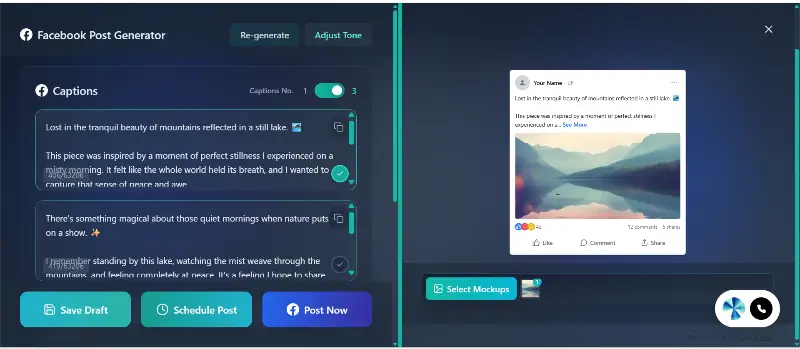
Verify the specific best time to post provided by the assistant. You can then:
Click “Post Now” for immediate, automatic publishing to Facebook.
Click “Schedule,” set your preferred date and time (or choose the optimal time provided), and your assistant will ensure the post goes live automatically.
Ready to Turn Facebook Likes into Art Sales?
Stop letting administrative anxiety control your creative schedule. Brushly is built by artists, for artists, to handle the strategy, the writing, and the publishing, so you can do what you love.
Ready to maintain a professional, engaging Facebook presence with zero daily effort?
➡️ Log in to Brushly now and try the Facebook Post feature!