You finish a painting at eleven at night, photograph it under the desk lamp, type "New piece! 🎨 #art #painting", and post it. Forty likes, two heart emojis, no messages. The next week you're busy, so you don't post at all.
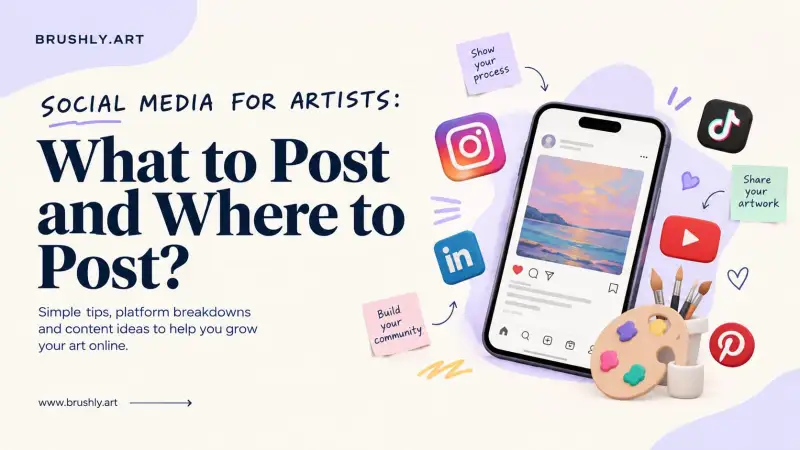
Social media works for artists when it's consistent and specific. Pick one or two platforms where your buyers actually are. Post a repeatable mix: the finished work, the process, the story, the piece in a real room, and you in the studio. Write captions that say what the piece is and how to get it, use a handful of specific hashtags, and move interested people to your email list and your portfolio, where they can buy. Below: which platform suits what, a weekly posting plan, captions and hashtags that help, how selling from a post actually works, and how to post everywhere without losing every evening.
Which platforms suit artists
You don't need to be everywhere. Choose based on who buys your work and how you like to work.
| Platform | Good for | What tends to work |
|---|---|---|
| Visual discovery, collectors, other artists | Finished pieces, process reels, carousels, studio life | |
| Local audiences, groups, events, older collectors | Show and fair announcements, stories, community groups | |
| Evergreen search, interiors and decor browsers | Pins that link back to the piece on your website | |
| Commissions from businesses, corporate art, teaching | Projects, commissions, professional milestones | |
| X | Art community conversation, news, writers and curators | Short updates, threads on process, joining conversations |
If you're starting from nothing, Instagram plus one other platform is plenty. Pinterest is worth adding early if your work suits homes, because a Pin keeps sending people to your site long after you've posted it.
What to post: a weekly rhythm
Consistency comes from not having to invent something every day. Rotate through a small set of post types and the calendar mostly fills itself.
| Day | Post type | Example |
|---|---|---|
| Monday | Process | A 20-second reel of the first washes going down |
| Wednesday | The story | Why you painted it, where the idea came from |
| Friday | The finished piece | A clean photo, size, medium, price or "available" |
| Weekend | In a room, or you | The piece on a wall, or a photo of you at work |
Three posts a week is a good target. Two you can keep beats five you'll abandon by March. For video, short process clips are the easiest place to start. There are more ideas in our guide to Instagram Reel ideas for artists, and the first two seconds matter most, so it's worth borrowing from these hooks for Reels and Shorts.
Captions that sell
A good caption does four things, in this order.
A first line worth stopping for. It's all most people read. "I nearly painted over this one" beats "New work!"
The story, in two or three sentences. Where it came from, what you were trying to catch.
The facts. Medium, size, and either the price or a clear "available".
One next step. "DM me for details", "link in bio", or "reply with the word FOREST and I'll send the details".
Each platform wants a slightly different version. Instagram can take a longer story, Facebook suits a warmer, conversational note, LinkedIn wants the professional angle, and X needs the whole thing in a line or two. We've written separate guides for Instagram captions, Facebook posts, LinkedIn posts and posts on X.
Instagram hashtags for artists
Hashtags help people who don't follow you yet find your work. They work best when they're specific.
Mix four kinds. The medium (#watercolorpainting), the subject (#forestart), the style or approach (#loosewatercolor), and a place or community (#portlandartist, or a challenge you're part of).
Choose tags people actually browse. Look at the recent posts under a tag before you use it. If it's full of spam or completely unrelated work, skip it.
Fewer, better tags. A handful of tags that describe this exact piece will do more than thirty generic ones like #art and #artist, which move too fast for your post to be seen.
Rotate them. Keep a short list per series and swap in tags that suit each post, rather than pasting the same block every time.
Your bio does the rest of the discovery work. Visitors decide in seconds whether to follow, so it should say what you make and where to buy it. See our Instagram bio guide for examples.
How to sell art on Instagram
Likes don't pay for materials. Sales come from a short, clear path: post, conversation, purchase.
Make buying obvious. Say the price or "available, DM for price" in the caption. Many buyers won't ask if they have to guess.
Answer DMs quickly and warmly. A question about a painting is a buyer raising their hand. Reply with the size, a photo of it in a room, the price and how to pay.
Send them somewhere they can buy. A link in your bio to an online portfolio with prices and a buy button turns interest into a sale without the back-and-forth. Selling from your own site also means you're not giving a marketplace a cut, which we cover in selling artwork online with zero commission.
Invite people onto your email list. Followers see a fraction of your posts. People on your list see every new piece, which is why your best collectors should be there.
Posting everywhere with Brushly
Writing a different version of every post for every platform is where most artists give up. Brushly's social media tools start from the artwork instead. The Marketing page has a card for each channel: Instagram, X, LinkedIn, Facebook and Pinterest, plus email. There's also a one-click option that turns one artwork into a post for every channel and a collector email, and a row of content ideas such as behind the scenes, the artwork's story and a new collection launch.
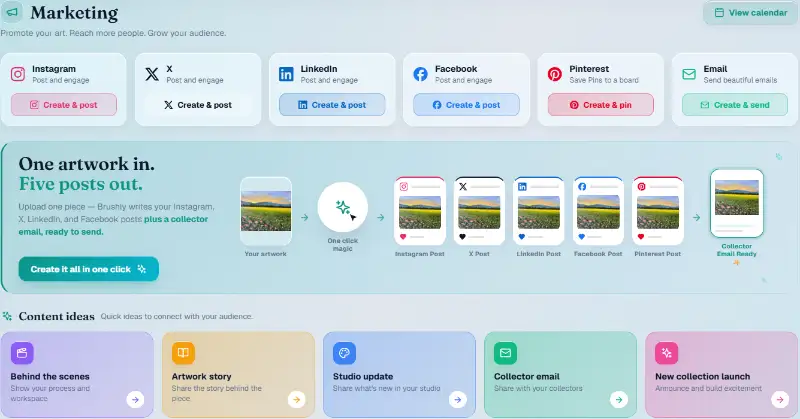
Choose a channel and an artwork, and the caption is written for that platform straight away, beside a live preview of how the post will look. For Instagram, the post also arrives with three room mockups of the piece already added after the artwork itself, which you can reorder or remove, or swap for other mockup rooms. From there you can edit the caption, regenerate it, copy it, post now, schedule it, or save it as a draft.
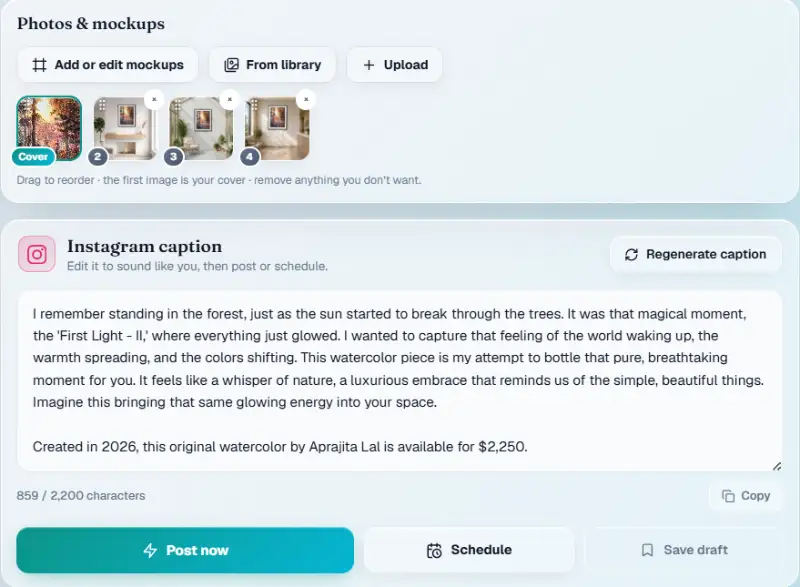
Read the caption before it goes out. For our test, a forest watercolour, the first version was 859 characters, in the first person, with the price, an invitation to DM and eight hashtags. That's a solid structure, but it leaned on phrases like "a luxurious embrace" and a #luxuryart tag that won't suit everyone. A few minutes of editing to make it sound like you is always worth it.
Pinterest works a little differently, because a Pin isn't a caption. It has a title, a description, alt text and a link, and you choose which of your boards it's saved to. Posting to Instagram, Facebook, LinkedIn and Pinterest is included on every plan, and X is included on Professional and Studio. The social Palette tools, Instagram Bio, Instagram Reel Ideas and Hooks for Reels and Shorts, help with the rest of the plan.
Staying consistent without burning out
Batch the work. Photograph three or four pieces on one good-light afternoon, write the captions in one sitting, and schedule the week. Reuse older work with a new angle: a detail shot, the piece in a room, the story of who bought it. And spend ten minutes after each post replying to comments, because conversations are what platforms reward and what turns followers into collectors.
Finally, give followers a reason to leave the platform. Link to your online portfolio in your bio, and invite people to your newsletter with Brushly's email marketing, so the relationship doesn't depend on an algorithm.
Quick answers
How often should artists post on social media?
Three times a week is a good target for Instagram, and less elsewhere. The best frequency is the one you can keep for a year.
Which social media platform is best for selling art?
Instagram is the usual starting point because it's so visual. Pinterest suits work for homes, Facebook suits local buyers and events, and LinkedIn suits commissions from businesses.
How many hashtags should an artist use?
A handful of specific, relevant tags per post, chosen for that piece, works better than a long block of generic ones.
Should I show prices on social media?
Yes, or at least say a piece is available and how to ask. Buyers who have to guess often move on.
Post your next piece everywhere it belongs, in less time than one caption used to take. Every new Brushly account comes with a 7-day free trial, so open Brushly, pick an artwork, and have posts for every channel ready to edit and schedule. See the plans for what each includes.